
Ctrl+K
Matter  documentation - Home Matter  documentation - Home
  • GitHub

Contents

  • Matter Glossary
  • Matter Project Flow
  • Visual Studio Code Development
  • Contributing to matter
    • Reporting bugs
    • How Pull Request Reviews Work in the Matter SDK
    • Guidelines for writing pull requests
  • Getting Started
    • Compiling, Running, and Controlling Matter examples
    • Changing Examples
    • SDK Architecture Overview
  • CI/CD Documentation
    • Daily Fail Summary
  • Development Controllers
    • chip-tool
      • Working with the CHIP Tool
    • matter-repl
      • Matter Python REPL
      • Using Python CHIP Controller advanced features
      • Working with Python CHIP Controller
  • IDs and Codes
    • Matter SDK CHIP_ERROR enums values
    • List of currently defined spec clusters
    • List of currently defined spec device types
    • List of currently defined ZAP clusters
  • Cluster and Device Type development
    • Implementing New Clusters & Device Types
    • ClusterTester Helper Class
    • Adding new clusters and device types to the codegen
    • Designing Clusters for Testing and Portability
  • Guides
    • Building Matter
    • Access Control Guide
    • Accepting Batch Commands
    • Matter Development and Testing with/on Apple Devices
    • Data Model Errata Engine
    • Device Attestation Revocation Testing Guide
    • Fabric Synchronization Guide
    • Joint Fabric Guide
    • The .matter IDL file format
    • Migrating Ember Clusters to Code-Driven Implementations
    • Simulated Device How-To (Linux)
    • Guide: Updating a Matter Device Using the OTA Provider Sample App
    • Writing and Updating Clusters
  • Platform Guides
    • Android
      • Building Android
    • ASR
      • ASR Getting Started Guide
    • Bouffalolab
      • Checking out the Matter code
      • Introduction to Matter factory data
      • Build OTA image
      • Bouffalo Lab SoCs
      • Bouffalo Lab with RPC console
    • Espressif (ESP32) Getting Started Guide
      • Bluetooth Low Energy (BLE)
      • ESP32 Application Usage Guide
      • Configuration options
      • Using ESP32 Diagnostic Logs Provider
      • ESP-Hosted Instruction
      • Using ESP32 Factory Data Provider
      • Flash and NVS encryption
      • Matter OTA
      • Providers Implemented for ESP32 Platform
      • RPC Console and Device Tracing
      • Using esp_secure_cert partition
      • Setup ESP-IDF and Matter Environment
      • Visual Studio Code Development
    • Infineon
      • Matter Software Update with Infineon PSoC6 example applications
      • Infineon OPTIGA™ Trust M Provisioning for Matter
    • Linux
      • Bluetooth Low Energy (BLE)
      • Debugging tips
    • NRF
      • Commissioning nRF Connect Accessory using Android CHIPTool
      • Using CLI in nRF Connect examples
      • Configuring nRF Connect examples
      • Performing Device Firmware Upgrade in the nRF Connect examples
      • Configuring factory data for the nRF Connect examples
      • nRF Connect platform overview
    • NXP
      • Matter Over-The-Air Software Update with NXP RTs example applications
      • NXP Matter Application Architecture for FreeRTOS platforms
      • Matter NXP Examples Guide for FreeRTOS platforms
      • Building and Running CHIP Linux Examples for i.MX 8M Mini EVK
      • NXP Manufacturing data
      • Matter NXP MCXW72 Applications Guide
      • NXP MCXW OTA guide
      • Thread Border Router usage
      • MATTER NXP RT1060 Applications Guide
      • MATTER NXP RT1170 Applications Guide
      • Matter NXP RW61x Applications Guide targeting FreeRTOS OS
      • NXP SE05x Secure Element Integration in Matter
      • Matter NXP Zephyr Application
      • Matter Over-The-Air Software Update with NXP using Zephyr example applications
    • OpenThread
      • Setup OpenThread Border Router on Raspberry Pi
      • Configuring OpenThread Radio Co-processor on nRF52840 Dongle
    • Silabs
      • Silabs CLI Guide
      • Standard Application Behavior Guide
      • Matter Software Update with EFR32 example applications
      • Silicon Labs Matter Solution Guide
    • STM32
      • STM32 Getting Started Guide
    • Telink
      • Telink Matter Getting Started Guide
      • TL3238X Retention Light-Switch App Build Guide
      • TL5218X Retention Light-Switch App Build Guide
      • TL7218X Retention Light-Switch App Build Guide
      • TL3238X Lighting App Build Guide
      • TL5218X Lighting App Build Guide
      • TL7218X Lighting App Build Guide
    • TI
      • Texas Instruments platform overview
      • Get started with SysConfig
      • Configure The Board Files with SysConfig
      • Configuring Intermittently Connected Devices on TI SimpleLink CC13x4_CC26x4 Platforms
      • Texas Instruments Matter Factory Data Programming User Guide
      • Configuring OpenThread libraries on TI CC13x4_CC26x4 Platforms
  • Style Guides
    • Coding Style Guide
    • CHIP Makefile Style Guide
    • Matter Documentation Style Guide
  • Examples
    • Matter Example Applications
    • Air Purifier
      • CHIP Air Purifier Example
      • CHIP Ameba Air Purifier Example
      • Matter CC32XXSF Air Purifier Example Application
      • CHIP Linux Air Purifier Example
    • Air Quality
      • Matter Linux Air Quality Example
      • Matter Air Quality Sensor Example
      • Matter Telink Air Quality Sensor Example Application
    • All clusters
      • CHIP Ameba All Clusters Example
      • Matter ASR All Clusters Example
      • Matter ESP32 All Clusters Example
      • CHIP PSoC6 All Clusters Example
      • Matter Linux/Mac All Clusters Example
      • Matter nRF Connect All Clusters Example Application
      • CHIP NXP All-clusters Application
      • Matter All Clusters Example Application
      • Matter Telink All Clusters Example Application
    • All clusters minimal
      • CHIP Ameba All Clusters Example
      • Matter ASR All Clusters Example
      • CHIP ESP32 All Clusters Example
      • CHIP PSoC6 All Clusters Example
      • Matter nRF Connect All Clusters Example Application
      • Matter Telink All Clusters Minimal Example Application
    • All devices
      • Matter All-Devices Application
      • Shared Device Capabilities (Special Case)
      • Matter Device Types Catalog
      • Getting Started: Wi-Fi PAF for the Commissioning Proxy
      • Out-of-Band (OOB) Control and Simulation Accessors
      • All-Devices Providers
      • All Devices App for ESP32
      • Matter All-Devices Application — Silabs (EFR32)
      • All Devices App for Telink
      • How to Add a New Simulated Device
      • Architecture & Design
      • Custom Product Baseline Guide
      • Application Initialization & Command Line Options
      • Matter Clusters Implementation Status (160 total)
      • Matter Device Types Implementation Status
      • Testing & Simulation Guide
      • Out-of-Band Control Architecture
    • Bridge
      • Matter ASR Bridge Example
      • Matter ESP32 Bridge App Example
      • Matter Linux Bridge Example
      • Matter Telink Bridge Example Application
    • Camera
      • CHIP Linux Camera Example App
      • Camera App Architecture and Design
    • Camera
      • Matter Camera Controller Example
    • CHEF
      • MATTER CHEF APP
      • Matter Shell - Device Layer module
      • Matter Shell - OpenThread CLI pass-through
      • Matter Shell Reference
      • CHIP nRF Connect SDK Shell Application
      • Chef Build Conventions
    • CHIP Tool example
      • Matter Client Example
    • Closure
      • CHIP Linux Closure Example App
      • Matter SiWx917 Closure Example
    • Contact Sensor
      • Matter Bouffalo Lab Contact Sensor Example
      • Matter Linux Contact Sensor Example
      • Matter NXP Contact Sensor Example Application
      • Matter Telink Contact Sensor Example Application
    • CHIP Tool Darwin
      • Matter darwin-framework-tool
    • Dishwasher
      • Matter Linux Dishwasher Example
      • Matter Silabs dishwasher Example
    • Electrical Protection
      • CHIP Linux Electrical Protection Example
    • Energy Gateway
      • Matter ESP32 Energy Gateway Example
      • Matter Linux Energy Gateway Example
    • EVSE
      • Matter ESP32 EVSE Example
      • Matter Linux EVSE Example
      • Matter EFR32 EVSE Example
    • Fabric Admin
      • Matter Fabric Administrator Example
    • Fabric Bridge
      • Matter Linux Fabric Bridge Example
    • Fabric Sync
      • Matter Linux Fabric Sync Example
    • Java matter controller
      • Matter Controller Java App Example
    • Joint Fabric Admin
      • Matter Joint Fabric Admin Example
    • Joint Fabric Control
      • Matter Joint Fabric Control Example
    • Kotlin matter controller
      • Matter Controller Kotlin App Example
    • Laundry washer
      • CHIP NXP Laundry Washer Application
      • CHIP NXP Zephyr Laundry Washer Application
    • Light switch
      • CHIP Ameba Light Switch Example
      • Matter ASR Light Switch Example
      • Matter ESP32 Light-switch Example
      • Matter Genio Light Switch Example
      • Matter CYW30739 Light Switch Example
      • Matter nRF Connect Light Switch Example Application
      • Matter QPG6200 SDK
      • Matter Light Switch Example Application
      • Matter EFR32 Light Switch Example
      • Matter Telink Light Switch Example Application
      • Matter Light Switch Example Application
      • Matter QPG6200 Light Switch Example Application
    • Lighting
      • CHIP Ameba Lighting Example
      • Matter ASR Lighting Example
      • Matter BEKEN Lighting Example
      • Matter Bouffalo Lab Lighting App Example
      • Matter ESP32 Lighting Example
      • Matter Genio Lighting Example
      • Matter CYW30739 Lighting Example
      • CHIP PSoC6 Lighting Example
      • CHIP Linux Lighting Example
      • Matter nRF Connect Lighting Example Application
      • Matter NXP Lighting Example Application
      • Python-based lighting example (bridge) device to DALI
      • Matter QPG6200 SDK
      • Matter Lighting Example Application
      • Matter Realtek Lighting Example Application
      • Matter EFR32 Lighting Example
      • Matter Silicon Labs Lighting Example (Zephyr)
      • Matter STM32 Lighting Example over thread
      • Matter STM32 Lighting Example over thread
      • Matter Telink Lighting Example Application
        • Matter Lighting App Multi-Endpoint Configuration Guide
      • Matter Lighting Example Application
      • CHIP Tizen Lighting Example
      • Matter QPG6200 Lighting Example Application
    • Lighting without unique id
      • CHIP Linux Lighting Example (Data Mode, No Unique ID)
    • Lit ICD
      • Matter ESP32 LIT ICD Example
      • Matter nRF Connect LIT ICD Example Application
      • Matter EFR32 Lit ICD Example
    • Lock
      • Matter ASR Lock Example
      • Matter CC32XXSF Lock Example Application
      • Matter ESP32 Lock Example
      • Matter Genio Lock Example
      • Matter CYW30739 Lock Example
      • Matter PSoC6 Lock Example
      • Lock Application for Linux
      • Matter nRF Connect Lock Example Application
      • Matter NXP Door Lock Example Application
      • Matter QPG6200 SDK
      • Matter Lock Example Application
      • Matter EFR32 Lock Example
      • Matter Telink Lock Example Application
      • Matter Lock Example Application
      • Matter QPG6200 Lock Example Application
    • Log source
      • log-source-app
    • Microwave ovens
      • Matter Linux Microwave Oven Example
    • Minimal MDNS
      • Minimal mDNS example
    • Network Infrastructure Manager
      • network-manager-app
    • OTA Provider
      • CHIP ESP32 OTA Provider Example
      • ota-provider-app
    • OTA Requestor
      • CHIP Ameba OTA Requestor Example
      • Matter ASR OTA Requestor Example
      • CHIP ESP32 OTA Requestor Example
      • Matter Genio Lighting Example
      • ota-requestor-app (Linux)
      • Matter OTA Requestor Example Application
      • Supported devices
    • Persistent storage
      • CHIP ESP32 Persistent Storage Example
      • CHIP PSoC6 Persistent Storage Example
      • CHIP Linux Persistent Storage Example
      • Matter QPG6200 SDK
      • CHIP QPG6200 Persistent Storage Application
    • Pump
      • Matter nRF Connect Pump Example Application
      • Matter EFR32 Pump Example
      • Matter Telink Pump Controller Example Application
      • Matter Pump Example Application
    • Pump controller
      • Matter nRF Connect Pump Example Application
      • Matter Telink Pump Controller Example Application
      • Matter Pump Controller Example Application
    • Refrigerator
      • CHIP Linux Refrigerator Example
      • Matter Refrigerator and Temperature Controlled Example
    • RVC
      • RVC example app
    • Shell
      • Matter Shell Reference
      • Matter Shell - Device Layer module
      • Matter Shell - OpenThread CLI pass-through
      • Matter Shell - App Server module
      • Matter Shell Application
      • Matter nRF Connect SDK Shell Application
      • Matter Telink Shell Example Application
    • Smoke CO Alarm example
      • Matter EFR32 Smoke CO Alarm Example
      • Matter Telink Smoke CO Alarm Example Application
    • Thread Border Router
      • Matter ESP32 Thread Border Router Example
    • Temperature measurement
      • Matter ASR Temperature Measurement Example
      • Matter ESP32 Temperature Sensor Example
      • Matter Telink Temperature Measurement Example Application
    • Thermostat
      • Matter ASR Thermostat Example
      • Matter Genio Thermostat Example
      • Matter CYW30739 Thermostat Example
      • Matter Linux Thermostat Example
      • CHIP NXP Thermostat Application
      • Matter QPG6200 SDK
      • Matter Thermostat Example Application
      • Matter EFR32 Thermostat Example
      • Matter Telink Thermostat Example Application
      • Matter QPG6200 Thermostat Example Application
    • TV
      • Matter TV Example (Media Player)
      • Matter tv app common-api
      • Content App
      • Matter TV Example
    • TV casting
      • Matter TV Casting Android App Example
      • Matter TV Casting Darwin (iOS/macOS) App Example
      • Matter TV Casting iOS App Example
      • CHIP TV Casting App Example
      • Matter Casting APIs
    • Virtual Device App
      • Matter Android Virtual Device App Example
    • Water Heater
      • Matter ESP32 Water Heater Example
      • Matter Linux Water Heater Example
      • Matter EFR32 Water Heater Example
    • Water Leak Detector
      • Matter Linux Water Leak Detector Example
    • Window
      • Matter nRF Connect Window Covering Example Application
      • Matter Window Covering Example Application
      • Matter EFR32 Window Covering Example
      • Matter Telink Window Example Application
  • Discussion
    • LwIP changes for Matter
  • Testing Guides
    • ChipDeviceCtrl.py API
    • CI testing
    • Fuzz testing
    • Integration Test utilities
    • Integration and Certification Tests
    • PICS and PIXITs
    • Python framework tests
    • Unit testing
    • YAML tests
    • YAML Pseudo-clusters
    • YAML Schema
  • Tips and Troubleshooting
    • ccache in CI: troubleshooting and controls
    • Device discovery from a Host computer (mDNS Scanning)
    • Troubleshooting Avahi
  • Tools
    • Matter/CHIP Certificate Tool
    • SPAKE2P Parameters Tool
    • Memory usage scripts
    • SPAKE2+ Python Tool
    • ELF binary size information
    • NXP Factory Data Generator
    • NXP OTA image tool
    • FactoryDataProvider for EFR32 Matter device
    • Silabs OTA image tool
    • Silabs Factory Data Generator
    • Manufacturing Partition Generator Utility
  • ZAP and Codegen
    • Code generation
    • ZAP
  • Upgrading notes
  • Project issues
  • .md

Telink Matter Getting Started Guide

Contents

  • Prerequisites
    • Chip and Board used in the guide
    • Hardware
    • Software
    • Telink Matter ↔ Telink Zephyr Dependency
  • Step 1: Set up the Telink Zephyr SDK
  • Step 2: Get the Matter source code
    • 2.1 Install Matter host dependencies
    • 2.2 Clone and set up the Matter repository
    • 2.3 Bootstrap the Matter build environment
  • Step 3: Build a Matter example
    • 3.1 Activate the environment
    • 3.2 Build with west (default configuration)
  • Step 4: Flash the firmware
    • 4.1 BDT (Telink flashing tool)
    • 4.2 UART console
  • Buttons and LEDs
  • Next steps
  • Appendix: TL3238X build configurations
  • Appendix: Per-board build READMEs
    • Lighting App
    • Light Switch App
  • FAQ
    • west build: board target not found (e.g. tl3238x)

Telink Matter Getting Started Guide#

This guide walks you through setting up the build environment, building, flashing, and running a Matter-over-Thread device on Telink RISC-V SoC platforms.

Prerequisites#

Chip and Board used in the guide#

Board target

Chip Family

EVK Version

Flash (default)

Notes

tl3238x

TL323X

C1T388A20_V1.1

2 MB

Matter only by default, Dual-mode (Matter + Zigbee) supported

Hardware#

Hardware

Description

PC

Ubuntu 24.04 LTS (recommended)

Development board

Select a board according to the Release Notes

Programmer

Telink Programmer V5

Serial adapter

USB-to-UART adapter

USB cable

Connects the PC to the programmer

Jumper wires

Connect the programmer to the development board

Software#

Software

Description

BDT flashing tool

Telink BDT (Burning and Debugging Tool) for Linux, for flashing and debugging

Toolchain

riscv64-zephyr-elf, for building Matter firmware

UART terminal

For viewing device logs

Telink Zephyr SDK

Provides the underlying drivers and system support

Telink Matter SDK

For developing Matter smart-home devices

Telink Matter ↔ Telink Zephyr Dependency#

The Telink Matter SDK is built on top of the Telink Zephyr SDK. The two are tightly coupled and must be used as a matched pair:

Component

Role

Required

Telink Zephyr SDK (dev-tlk_v4.1 branch)

Provides the Zephyr RTOS core, Telink HAL, BLE stack, MCUBoot, OpenThread, the WEST tool and build toolchain

✅

Telink Matter SDK (dev-tlk_v1.5 branch, this repo)

Provides the Matter protocol stack and Telink example applications; consumes the Telink Zephyr SDK via TELINK_ZEPHYR_BASE

✅

Both are required — the Matter SDK cannot be built without the Zephyr SDK, and the Zephyr SDK alone does not provide Matter support.

Step 1: Set up the Telink Zephyr SDK#

The Telink Matter examples use west build and require the Telink Zephyr SDK to be installed and exported via TELINK_ZEPHYR_BASE.

Set up the Telink Zephyr SDK first, then build and flash a sample application to verify the environment. For the full setup, build, and flashing instructions, see the Telink Zephyr SDK Getting Started guide.

Step 2: Get the Matter source code#

2.1 Install Matter host dependencies#

sudo apt-get install git gcc g++ pkg-config libssl-dev libdbus-1-dev \
  libglib2.0-dev libavahi-client-dev ninja-build python3-venv python3-dev \
  python3-pip unzip libgirepository1.0-dev libcairo2-dev libreadline-dev

2.2 Clone and set up the Matter repository#

mkdir -p ~/zephyrproject && cd ~/zephyrproject
git clone https://github.com/telink-semi/tl_matter.git connectedhomeip
cd connectedhomeip
git checkout <telink_matter_branch>     # e.g. dev-tlk_v1.5
./scripts/checkout_submodules.py --platform telink,linux

2.3 Bootstrap the Matter build environment#

The first run takes a while as it downloads all pip/gn dependencies:

source scripts/bootstrap.sh

If you switch commits or branches later, re-run bootstrap after cleaning:

rm -rf .environment
source scripts/bootstrap.sh

Step 3: Build a Matter example#

Telink Matter examples live under examples/<app-name>/telink/. Each example is built with west build (which invokes the Zephyr build system under the hood).

3.1 Activate the environment#

cd connectedhomeip
source scripts/activate.sh

3.2 Build with west (default configuration)#

cd examples/lighting-app/telink
west build -b tl3238x

The built firmware is at build/zephyr/zephyr.bin.

For other configurations (flash size, OTA + LZMA, dual-mode Matter + Zigbee), see Appendix: TL3238X build configurations.

Step 4: Flash the firmware#

4.1 BDT (Telink flashing tool)#

Telink provides the BDT (Burning Debug Tool) for flashing. On Windows use the BDT GUI (Telink BDT.exe). See the Telink Zephyr Getting Started — Flash the Firmware for the chip-to-BDT name mapping and the unlock/erase/write flow.
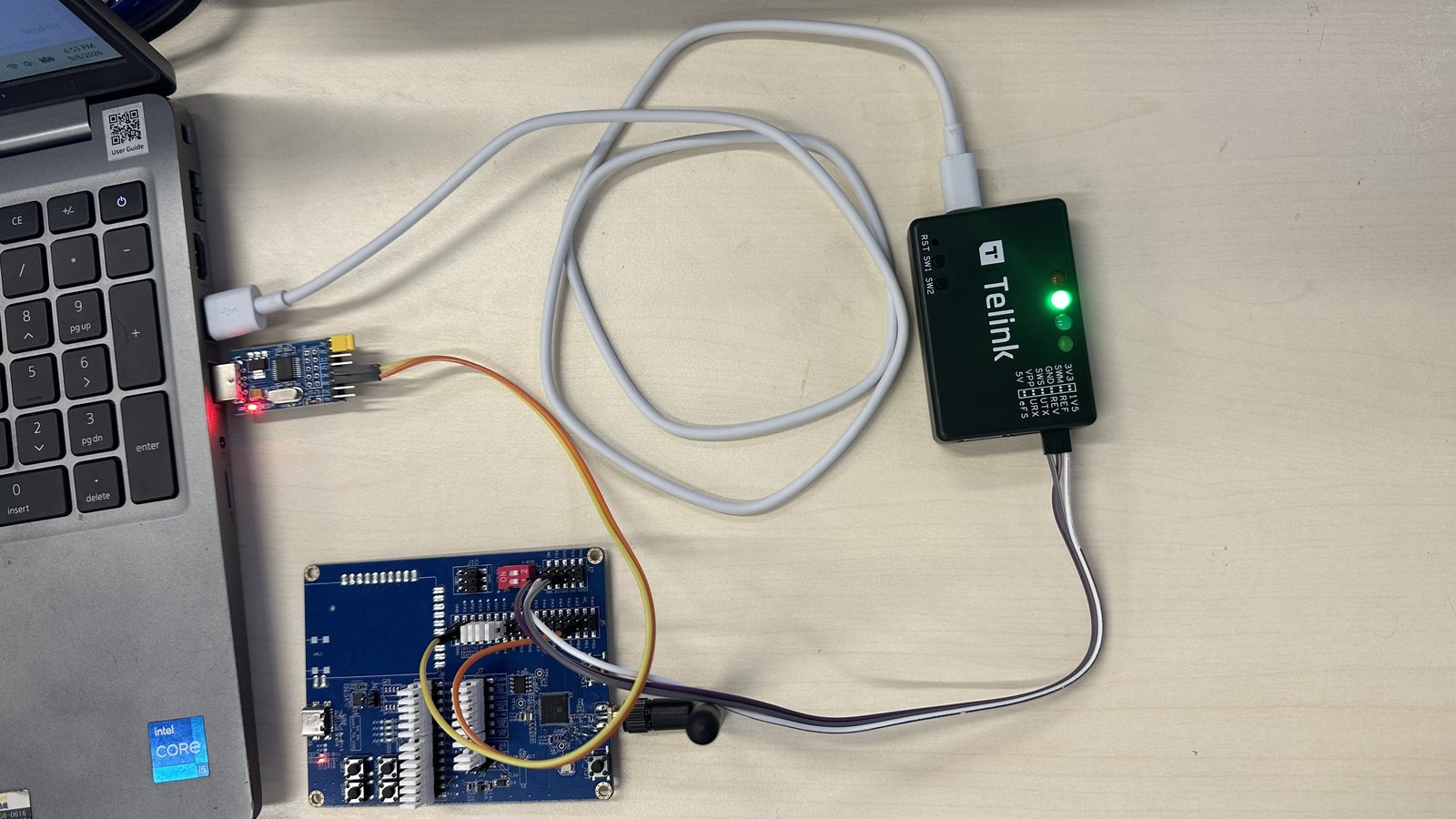
DUT, burning tool, and PC

4.2 UART console#

Connect UART to view device logs:

Name

Pin

RX

PB0 (pin 17 of J34 connector)

TX

PB2 (pin 16 of J34 connector)

GND

GND

Baud rate: 115200 bits/s.

After flashing, reset or power-cycle the board and open the UART terminal. The expected log output looks similar to:
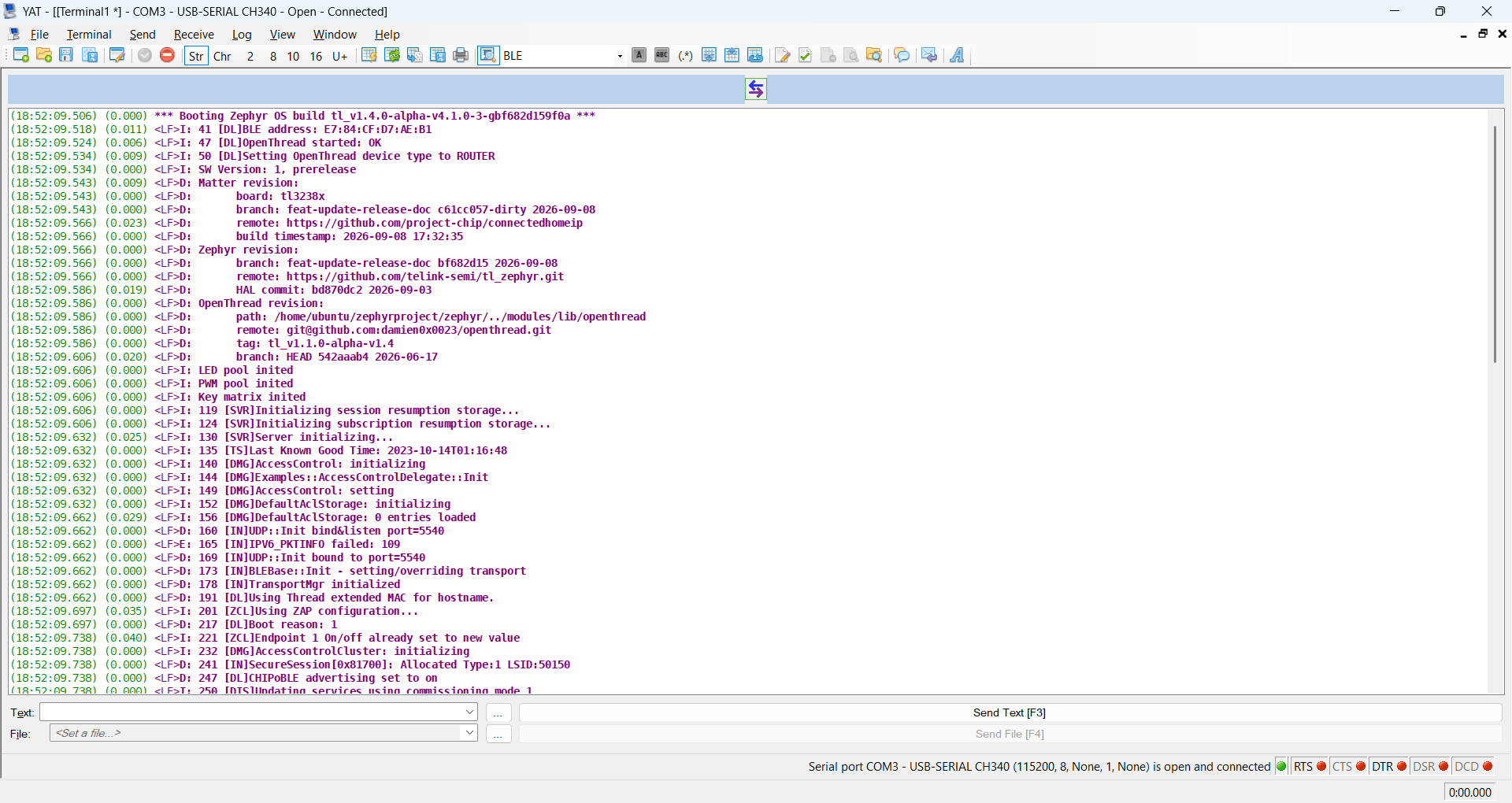
YAT terminal showing the DUT log

Buttons and LEDs#

The on-board buttons and LEDs provide basic control and status feedback:

Button

Function

Description

Button 1

Factory reset

Press 3 times to forget the commissioned Thread network

Button 2

App control

Manually triggers the application state (e.g. toggle lighting)

Button 3

Thread start

Commission with static credentials and enable Thread

Button 4

Open commission window

Opens the BLE commissioning window

Red LED — Thread network state:

State

Meaning

Short pulses

Not commissioned; Thread disabled

Frequent pulses

Commissioned; joining the Thread network

Wide pulses

Joined to the Thread network as a CHILD

Green LED — Identify (blinks when the Identify command is received).

Next steps#

  • Telink Zephyr Getting Started — Zephyr SDK setup, BDT flashing details, and board overviews.

  • Per-example README.md files under examples/<app>/telink/ — example-specific build commands, button/LED mappings, and chip-tool usage.

Appendix: TL3238X build configurations#

TL3238X supports several configurations depending on flash size and dual-mode (Matter + Zigbee) needs. Key combinations:

Config

Flash

OTA

LZMA

Dual-mode

Conf file

Default (no OTA, no MCUBoot)

2 MB

No

No

No

boards/tl3238x.conf

OTA + BT DFU + LZMA

2 MB

Yes

Yes

No

boards/tl3238x_2m_flash_ota_lzma.conf

Dual-mode (Matter + Zigbee) + OTA

4 MB

Yes

No

Yes

boards/tl3238x_4m_flash_dual_mode_ota.conf

⚠️ For 2 MB Flash + OTA, LZMA compression is required — a non-LZMA build will not fit.

Example — 2 MB Flash with OTA + LZMA, software version 2:

west build -p -b tl3238x -d build_tl3238x_lzma_v2 -- \
  -DCONF_FILE="prj.conf boards/tl3238x_2m_flash_ota_lzma.conf" \
  -DCONFIG_CHIP_DEVICE_SOFTWARE_VERSION=2

If your board has a flash size other than the default 2 MB, specify it:

west build -b tl3238x -- -DFLASH_SIZE=4m

Appendix: Per-board build READMEs#

Each supported board ships a dedicated *_README.md under examples/<app>/telink/boards/ with the exact build commands for every configuration of that board (default, OTA + LZMA, dual-mode Matter + Zigbee, 4 MB flash, Software Version 2 for DFU/OTA images, etc.).

Lighting App#

  • TL3238X: tl3238x_README.md

  • TL5218X: tl5218x_README.md

  • TL7218X: tl7218x_README.md

Light Switch App#

  • TL3238X Retention: tl3238x_retention_README.md

  • TL5218X Retention: tl5218x_retention_README.md

  • TL7218X Retention: tl7218x_retention_README.md

FAQ#

west build: board target not found (e.g. tl3238x)#

If west build -b <board> fails with a “board not found” error, the board is most likely not defined in the branch you are on. Telink boards are only available in the Telink fork on its matched branch, so make sure both repositories are on the correct branch:

# Telink Zephyr SDK — must be the Telink fork, dev-tlk_v4.1
cd ~/zephyrproject/zephyr
git remote -v                 # should include telink-semi/tl_zephyr
git branch --show-current     # should be dev-tlk_v4.1
git checkout dev-tlk_v4.1     # switch if needed
west update

# Telink Matter SDK — dev-tlk_v1.5
cd ~/zephyrproject/connectedhomeip
git branch --show-current     # should be dev-tlk_v1.5
git checkout dev-tlk_v1.5     # switch if needed
./scripts/checkout_submodules.py --platform telink,linux

previous

Telink

next

TL3238X Retention Light-Switch App Build Guide

Contents
  • Prerequisites
    • Chip and Board used in the guide
    • Hardware
    • Software
    • Telink Matter ↔ Telink Zephyr Dependency
  • Step 1: Set up the Telink Zephyr SDK
  • Step 2: Get the Matter source code
    • 2.1 Install Matter host dependencies
    • 2.2 Clone and set up the Matter repository
    • 2.3 Bootstrap the Matter build environment
  • Step 3: Build a Matter example
    • 3.1 Activate the environment
    • 3.2 Build with west (default configuration)
  • Step 4: Flash the firmware
    • 4.1 BDT (Telink flashing tool)
    • 4.2 UART console
  • Buttons and LEDs
  • Next steps
  • Appendix: TL3238X build configurations
  • Appendix: Per-board build READMEs
    • Lighting App
    • Light Switch App
  • FAQ
    • west build: board target not found (e.g. tl3238x)

By Matter Contributors

© Copyright 2020-2025, Matter Contributors.