
MATTER NXP RT1060 Applications Guide#
Introduction#
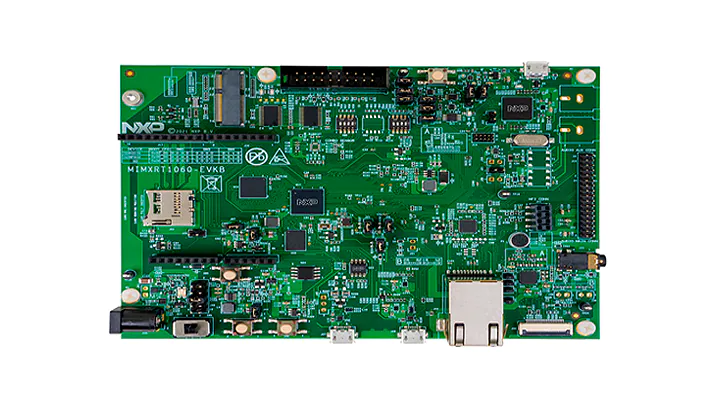
The RT1060 application provides a working demonstration of the RT1060 board integration, built using the Project MATTER codebase and the NXP MCUX SDK.
The example targets the NXP MIMXRT1060-EVK-B board by default. It is also possible to use the older MIMXRT1060-EVK board, build and board setup instructions differ in some steps.
Supported configurations#
Here are listed configurations supported on RT1060.
Matter over Wi-Fi :
RT1060 + IW416 (Wi-Fi + BLE)
RT1060 + 88W8801 (Wi-Fi)
RT1060-EVK-C + IW612 (Wi-Fi + 15.4 + BLE)
RT1060-EVK-C + IW610 (Wi-Fi + 15.4 + BLE)
Matter over Thread :
RT1060 + K32W0 (15.4 + BLE)
RT1060-EVK-C + IW612 (Wi-Fi + 15.4 + BLE)
RT1060-EVK-C + IW610 (Wi-Fi + 15.4 + BLE)
Matter over Wi-Fi with Openthread Border Router support :
RT1060 + 88W8801 + K32W0x1DK6
RT1060-EVK-C + IW612 (Wi-Fi + 15.4 + BLE)
RT1060-EVK-C + IW610 (Wi-Fi + 15.4 + BLE)
Note: For CMake builds, Matter over Wi-Fi with
RT1060-EVK-C + IW612is the default configuration when noprj_<flavour>.conffile and no transceiver option is specified in the build.
Hardware requirements RT1060 + transceiver#
Hardware requirements RT1060+IW416#
Host part:
1 MIMXRT1060-EVK-B or MIMXRT1060-EVK board
external 5V supply
Transceiver part:
1 AzureWave AW-AM510-uSD evaluation board
Jumper settings for MIMXRT1060-EVK-B (enables external 5V supply):
remove J40 5-6
connect J40 1-2
connect J45 with external power (controlled by SW6 - position 3)
Jumper settings for MIMXRT1060-EVK (enables external 5V supply):
remove J1 5-6
connect J1 1-2
connect J2 with external power (enabled by SW1 - position 3)
The hardware should be reworked according to the chapter Hardware Rework Guide
for MIMXRT1060-EVK-B and AW-AM510-uSD or the chapter Hardware Rework Guide for
MIMXRT1060-EVK and AW-AM510-uSD in the document
Hardware Rework Guide for EdgeFast BT PAL which can be found in the NXP
RT1060 SDK (docs/wireless/bluetooth/edgefast_bluetooth/Hardware Rework Guide
for EdgeFast BT PAL.pdf):
Make sure resistors R368/R376/R347/R349/R365/R363/R193/R186 are removed.
Only the SDK package downloaded from https://mcuxpresso.nxp.com contains the PDF document mentioned above, it is not present in the SDK downloaded from GitHub using the west tool.
Jumper settings for AzureWave AW-AM510-uSD Module:
J4 1-2:
VIO1.8V (Voltage level of SD-IO pins is 1.8V)J2 1-2: 3.3V
VIO_uSD(Power Supply from uSD connector)The pin 1 of J4 is not marked on the board. Please note that pin numbering of J4 is opposite to J2.
Plug AW-AM510-uSD into uSD connector J22 on MIMXRT1060-EVK-B or J39 on MIMXRT1060-EVK.
Connect the following pins between RT1060 and AW-AM510-uSD to enable Bluetooth HCI UART:
PIN NAME |
AW-AM510-uSD |
MIMXRT1060-EVK-B |
MIMXRT1060-EVK |
PIN NAME OF RT1060 |
GPIO NAME OF RT1060 |
|---|---|---|---|---|---|
|
|
|
|
|
|
|
|
|
|
|
|
|
|
|
|
|
|
|
|
|
|
|
|
|
|
|
|
|
|
Attach external antenna into connector on AW-AM510-uSD.
Additional information about the AW-AM510-uSD can be found in the user manual UM11441 - Getting Started with NXP-based Wireless Modules and i.MX RT Platform Running RTOS, which can be found in the NXP RT1060 SDK (docs/wireless/UM11441-Getting-Started-with-NXP-based-Wireless-Modules-and-i.MX-RT-Platform-Running-on-RTOS.pdf). Only the SDK package downloaded from https://mcuxpresso.nxp.com contains the PDF document, it is not present in the SDK downloaded from GitHub using the west tool.
Hardware requirements RT1060+88W8801#
Host part:
1 MIMXRT1060-EVK-B
Transceiver part :
1 88W8801 2DS M.2 Module (rev A)
1 Murata uSD-M.2 Adapter (rev B1)
The 88W8801 2DS M.2 Module should be inserted into the Murata uSD-M.2 Adapter
and inserted in the uSD slot J22 of MIMXRT1060-EVK-B. The Murata uSD-M.2 Adapter
can be powered up using uSD pins. For that, set the J1 jumper of Murata uSD-M.2
to position 2-3 (Position 2-3: VBAT supply, typical 3.1 ~ 3.3V, from microSD
connector).
Note: as the 88W8801 module supports only the 2.4 GHz Wi-Fi band, it is mandatory to connect it to a Wi-Fi access point on the 2.4 GHz band.
Hardware requirements RT1060 + K32W0#
Host part:
1 MIMXRT1060-EVK-B or MIMXRT1060-EVK board
Transceiver part:
1 OM15076-3 Carrier Board (DK6 board)
1 K32W0 Module to be plugged on the Carrier Board
Board settings
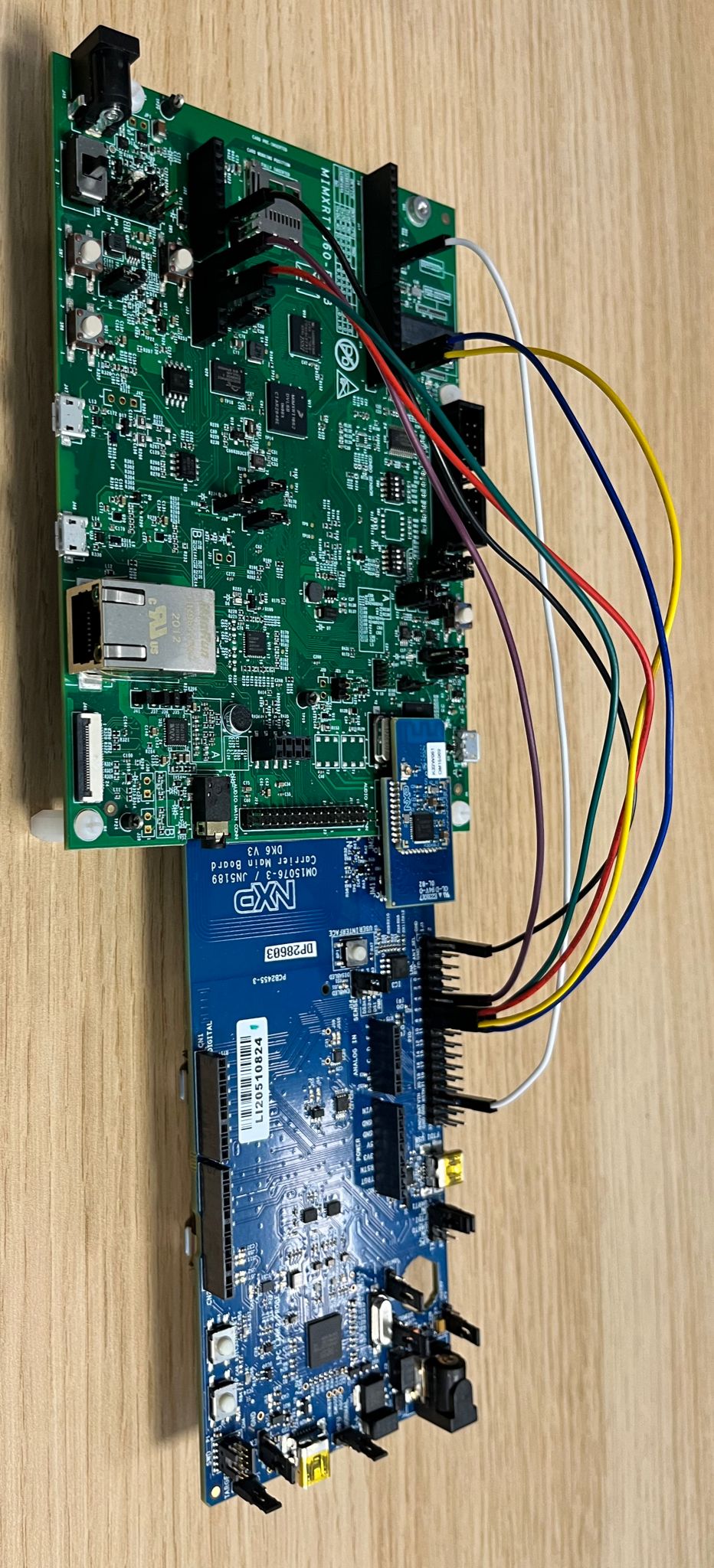
The below table explains pin settings (UART settings) to connect the MIMXRT1060-EVK-B (host) to a k32w061 transceiver (rcp).
PIN NAME |
DK6 (K32W061) |
MIMXRT1060-EVK-B |
MIMXRT1060-EVK |
PIN NAME OF RT1060 |
GPIO NAME OF RT1060 |
|---|---|---|---|---|---|
|
|
|
|
|
|
|
|
|
|
|
|
|
|
|
|
|
|
|
|
|
|
|
|
|
|
|
|
|
|
|
|
|
|
|
|
|
|
|
|
|
|
The below picture shows pins connections for the MIMXRT1060-EVK.
Hardware requirements RT1060-EVK-C + IW612 / IW610#
Host part:
1 MIMXRT1060-EVK-C
Hardware should be reworked as below:
populate R93, R96, R2155, R2156, R2157, R2158, R2159 with 0Ohm resistors
J76 and J107 jumpers in 2-3 position.
J109 and J110 jumpers in 1-2 position.
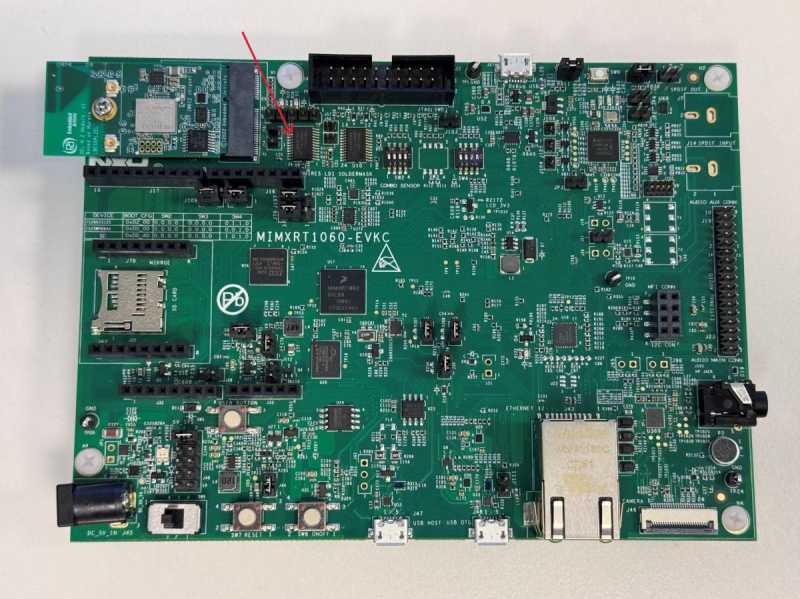
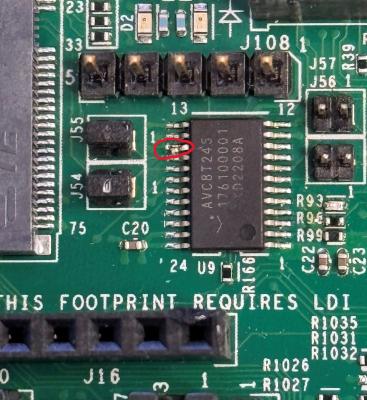
most of MIMXRT1060-EVK-C board would already have the re-work, but if not already done, the following modification is required: disconnect pin15 of component U9
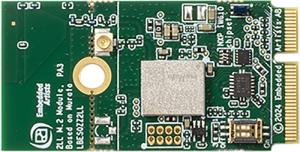
Transceiver part :
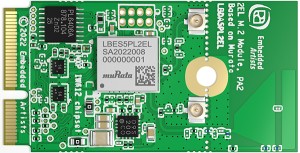
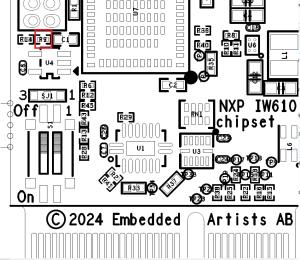
2 2LL M2 IW610 Secure Module Need to populate R9 with a 10kOhm resistor:
Hardware requirements RT1060 + 88W8801 + K32W0x1DK6#
i.MX RT1060 EVK-A or EVK-B board
88W8801 module (for Wi-Fi connection), for example 88W8801 2DS M.2 Module (rev A) and Murata uSD-M.2 Adapter (rev B1)
K32W0x1 mezzanine module (for Thread connection)
IOT_ZTB-DK006carrier board for the K32W0x1 module (referenced as DK6 carrier board)
Building#
Make sure to follow shared build instructions from MATTER NXP Examples Guide for FreeRTOS platforms to set-up your environment.
In the following steps, the “all-clusters-app” is used as an example.
CMake Build System#
The example supports configuration and build with CMake build system. You can find more information in CMake Build System section which explains how to further configure your application build.
In the west build command, the board option can be replaced with
evkbmimxrt1060 for MIMXRT1060-EVK-B, or evkcmimxrt1060 for
MIMXRT1060-EVK-C board.
RT1060 platform supports various transceivers based on the configuration being used. For this purpose, the dedicated transceiver Kconfig must be set correctly in the build command.
Build configuration |
Board |
Transceiver Kconfig |
|---|---|---|
Matter-over-WiFi with BLE |
MIMXRT1060-EVK-B + IW416 |
|
Matter-over-WiFi without BLE |
MIMXRT1060-EVK-B + 8801 |
|
Matter-over-WiFi with BLE |
MIMXRT1060-EVK-C + IW612 |
|
Matter-over-WiFi with BLE |
MIMXRT1060-EVK-C + IW610 |
|
Matter-over-Thread |
MIMXRT1060-EVK-B + K32W0 |
|
Matter-over-Thread |
MIMXRT1060-EVK-C + IW612 |
|
Matter-over-Thread |
MIMXRT1060-EVK-C + IW610 |
|
Matter-over-WiFi with OT Border Router |
MIMXRT1060-EVK-B + 8801 + K32W0 |
|
Matter-over-WiFi with OT Border Router |
MIMXRT1060-EVK-C + IW612 |
|
Matter-over-WiFi with OT Border Router |
MIMXRT1060-EVK-C + IW610 |
|
Example of build command to build the All-Clusters app with Matter-over-WiFi configuration on RT1060-EVK-C + IW612 platform :
user@ubuntu:~/Desktop/git/connectedhomeip$ west build -d build_matter -b evkcmimxrt1060 examples/all-clusters-app/nxp -DCONF_FILE_NAME=prj_wifi.conf -DCONFIG_MCUX_COMPONENT_component.wifi_bt_module.IW61X=y
Note that the RT1060 example supports various configurations that can be
provided to the CONF_FILE_NAME variable, you can refer to the
table of available project configuration files and platform compatibility
to check all the supported configurations.
For RT1060 + K32W061 configuration, the transceiver binary build is generated
automatically by the host build in
third_party/nxp/nxp_matter_support/cmake/build_helpers.cmake.
Note : BLE and Matter-CLI are enabled by default in Matter applications built with CMake. To disable them, you can refer to the How to customize the CMake build section.
Manufacturing data#
See Guide for writing manufacturing data on NXP devices
Other comments:
The RT1060 all cluster app demonstrates the usage of encrypted Matter manufacturing data storage. Matter manufacturing data should be encrypted before flashing them to the RT1060 flash.
For development purpose the RT1060 all cluster app code could use the hardcoded AES 128 software key. This software key should be used only during development stage.
For production usage, it is recommended to use the OTP key which needs to be
fused in the RT1060 SW_GP2. The application note AN12800 should be followed to
get more information. In this case the all cluster app should be updated to
indicate to the DCP module to use the OTP key instead of the software key.
For that the call to FactoryDataPrvdImpl().SetAes128Key() should be changed to
FactoryDataPrvdImpl().SetKeySelected(KeySelect::) with the arg value
specifying where the OTP key is stored (kDCP_OCOTPKeyLow for [127:0] of
SW_GP2 or kDCP_OCOTPKeyHigh for [255:128] of SW_GP2). For more information the
RT1060 FactoryDataProviderImpl class description should be checked.
Flashing and debugging#
We recommend using JLink from Segger to flash the example application. It can
be downloaded and installed from
https://www.segger.com/products/debug-probes/j-link. Once installed, JLink can
be run to flash the application using the following steps :
$ JLink
J-Link > connect
Device> ? # you will be presented with a dialog -> select `MIMXRT1062XXX6B`
Please specify target interface:
J) JTAG (Default)
S) SWD
T) cJTAG
TIF> S
Specify target interface speed [kHz]. <Default>: 4000 kHz
Speed> # <enter>

J-Link > exec EnableEraseAllFlashBanks
J-Link > erase 0x60000000, 0x61000000
Program the application executable :
J-Link > loadfile <application_binary>
To program an application in binary format you can use the following command instead :
J-Link > loadbin <application_binary>.bin 0x60000000
Testing the example#
To test the example, please make sure to check the Testing the example section
from the common readme
MATTER NXP Examples Guide for FreeRTOS platforms.
UART details#
Testing the example with the CLI enabled will require connecting to UART1 and an additional UART, here are more details to follow for RT1060 platforms :
UART1 : To view output on this UART, a USB cable could be plugged in.
2nd UART : To view output on this UART, the following pin should be plugged to an
USB to UART adapter:UART8 for
MIMXRT1060-EVK-Cboard, useconnector J33 pin 1.UART2 for
MIMXRT1060-EVK-Bboard, useconnector J16 pin 7.UART2 for
MIMXRT1060-EVKboard, useconnector J22 pin 7.
OTA Software Update#
Over-The-Air software updates are supported with the RT1060-EVKC examples. The
process to follow in order to perform a software update is described in the
dedicated guide
‘Matter Over-The-Air Software Update with NXP RT example applications’.
Thread Border Router overview#
To enable Thread Border Router support see the build section.
The complete Border Router guide is located here.
Enabling SE05x Secure Element with MIMXRT1060-EVK-B#
Hardware connections#
Connections using OM-SE051ARD board :
Signal
EVKBMIMXRT1060 Pin
OM-SE051ARD Pin
I2C SDA
J17_9
J2_9
I2C SCL
J17_10
J2_10
3V3
J32_4
J8_4
GND
J17_7
J8_7
ENA (optional)
J17_1
J1_6
Build options#
Build the example with below options to offload crypto operations to SE05x using CMAKE configuration :
-DCONFIG_CHIP_SE05X=y
Example :
ubuntu@ubuntu-Latitude-5420:~/matter/connectedhomeip$ west build -d <out_dir> -b evkbmimxrt1060 examples/thermostat/nxp/ -DCONF_FILE_NAME=prj_wifi.conf -DCONFIG_MCUX_COMPONENT_component.wifi_bt_module.IW416=y -DCONFIG_CHIP_SE05X=y
NOTE To control secure element using enable pin, ensure to connect jumper J14 on OM-SE051ARD board to 3-4 pins. Also build the example with -DCONFIG_SE05X_HOST_GPIO=y option to allow rt1060 gpio to control the enable pin as required.
Refer SE05x for more details on configurations of SE05x.